
The framing crew has closed in the openings, the window order is ready to release, and someone notices that the bedroom units were scheduled by frame size instead of rough opening. A door swings the wrong way. One glazed assembly carries the wrong SHGC for the project's climate zone. Another row says “per plan.” These errors rarely stay on paper. They become RFIs, rejected submittals, return trips, delayed hardware, failed inspections, and installation decisions made with a tape measure in one hand and incomplete information in the other.
A window and door schedule prevents that chain reaction when the team treats it as a control document rather than a decorative sheet in the drawing set. It connects each opening to its dimensions, operation, materials, performance requirements, hardware, details, procurement status, and field instructions. The following approach focuses on the fields that create the most trouble on Texas and Southwest projects, where heat, solar exposure, severe weather, energy review, and fast-moving construction schedules leave little room for vague documentation.
Table of Contents
- What a Window and Door Schedule Actually Does on a Project
- Standard Fields Every Schedule Should Carry
- Tagging Systems That Keep Plans, Elevations, and Schedules in Sync
- Sample Schedule for New Construction Projects
- Sample Schedule for Replacement and Retrofit Projects
- Energy Performance Fields by Climate Zone
- The Highest-Risk Fields That Drive Change Orders
- Coordinating the Schedule with Estimating, Ordering, and Delivery
- From Schedule to Installer-Ready Instructions
- Verifying the Schedule Against Submittals and Field Measurements
- Quick-Reference Field Matrix for Fast Lookup
- Frequently Asked Questions About Window and Door Schedules
What a Window and Door Schedule Actually Does on a Project
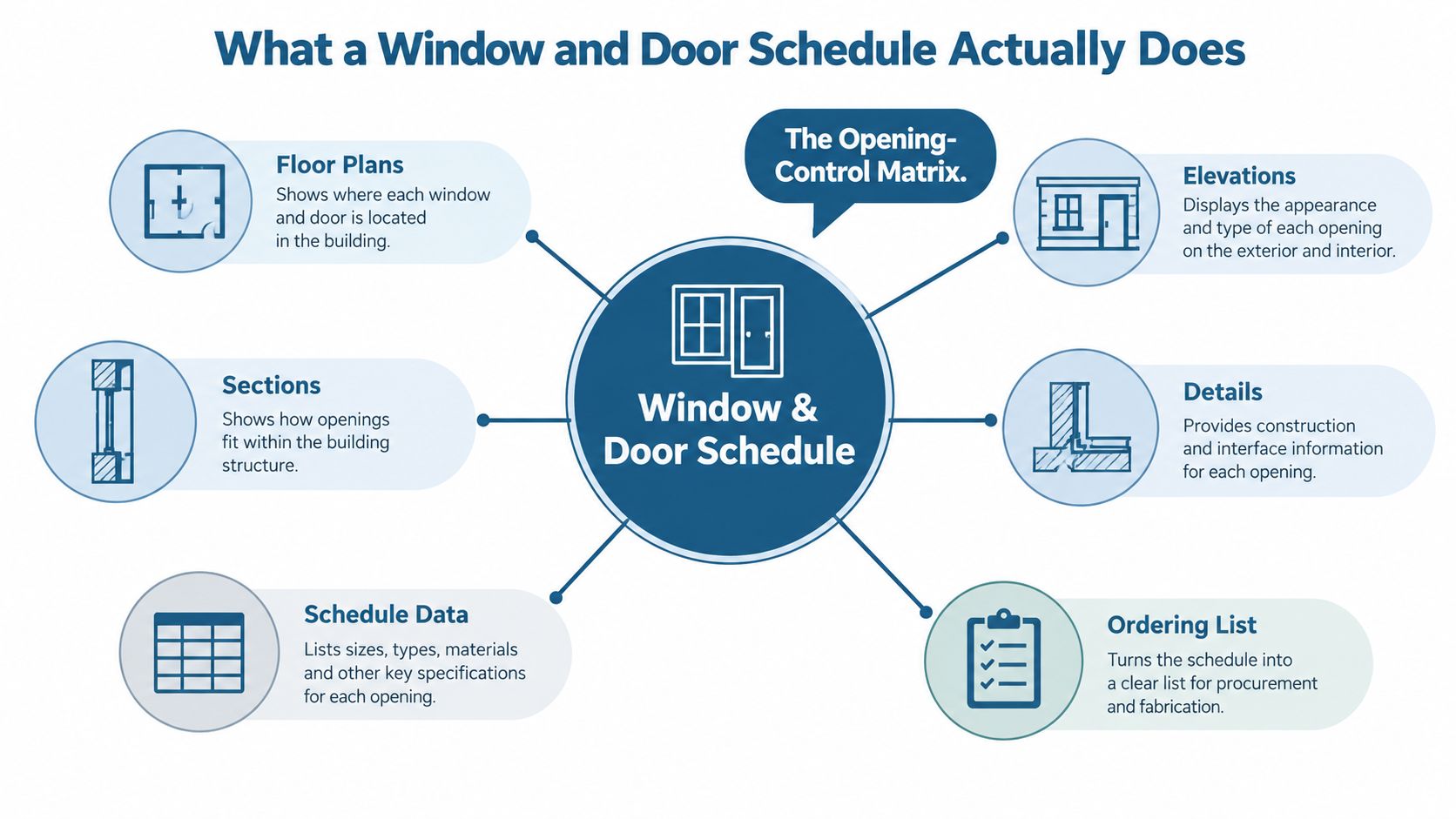
A window and door schedule is the project's opening-control matrix. It links a tag on the floor plan or elevation to one coordinated record that tells the estimator, supplier, reviewer, framer, installer, and inspector what belongs in that opening. The schedule isn't just a list of products. It's the place where the project decides which assembly goes where and how that assembly must perform.
The basic chain is straightforward:
- Plans locate the opening. The wall, room, orientation, and structural opening establish context.
- Elevations show appearance. Grilles, panels, proportions, and exterior relationships become visible.
- Details explain construction. Sills, flashing, thresholds, head conditions, and interfaces define installation.
- The schedule identifies the assembly. The mark connects those documents to size, material, glazing, hardware, ratings, and notes.
- Procurement uses the row. Estimators and purchasing teams extract quantities and product requirements from the same record.
- Field teams verify the result. Supers and inspectors compare delivered units and installed conditions against the mark.
Industry guidance describes window and door schedules as tables that connect plan symbols or tags with specifications, commonly carrying at least 8 to 12 data fields such as code number, size, material, finish, hardware, ratings, manufacturer, product series, and remarks (window and door schedules guidance). Modern BIM workflows often populate the schedule during design development, while floor plans reference each row through tag numbers.
The schedule also sits at the center of the submittal chain. Rough openings in framing documents, tags in elevations, and performance information in energy calculations should resolve to the same mark. If the U-factor changes in the submittal but not in the schedule, the reviewer has to reconcile conflicting records. If handing is missing, the hardware supplier can't reliably release the set. If dimensions are vague, installation turns into a field-measurement exercise that should have happened before ordering.
For teams producing coordinated visual documentation, tools that create 3D renders from drawings can help communicate how scheduled openings relate to elevations and interior spaces. A render won't replace the schedule, but it can expose an awkward swing, a mismatched proportion, or a sill condition that a table alone doesn't make obvious.
Standard Fields Every Schedule Should Carry
A reliable schedule answers one practical question: what must the estimator, supplier, installer, reviewer, and inspector know without making assumptions? Missing information becomes a change order or a failed inspection, especially on Texas and Southwest projects where heat, solar exposure, wind, and code requirements make opening performance matter.
Start with the mark or tag, then record enough location information to find the opening quickly. W1, W2, and D1 work when each identifier stays unique and stable. Add the room, grid, elevation, level, or another traceable reference. Repeated units may look identical on a plan but still have different sill conditions, handing, or inspection requirements.
Record both unit size and rough opening. Unit size describes the manufactured assembly. Rough opening describes the framing opening and installation clearance. They are related, not interchangeable. Use one width-by-height format throughout the project, and state whether each dimension is nominal, actual, or dependent on the selected manufacturer.
| Field | Purpose | What Goes Wrong If Vague |
|---|---|---|
| Mark or tag | Links the opening to plans, elevations, details, and submittals | The wrong unit reaches the opening or reviewers cannot trace the decision |
| Location or room | Identifies where the assembly belongs | Similar units are swapped between rooms or elevations |
| Unit size | Defines the manufactured assembly | Purchasing orders the wrong product dimension |
| Rough opening | Coordinates framing and installation clearance | The unit does not fit, or framing must be altered |
| Operation type | Distinguishes fixed, single-hung, casement, slider, pivot, or swing operation | A visually similar but functionally wrong product is ordered |
| Frame material and finish | Establishes substrate, appearance, and durability expectations | Color, profile, or compatibility conflicts appear late |
| Glazing description | Identifies glass construction, coatings, safety requirements, and appearance | Delivered glass fails performance or safety review |
| U-factor and SHGC | Records measurable thermal and solar performance | The product does not match energy calculations or the declared climate zone |
| Handing | Shows the door swing or operating direction from the correct reference side | Hardware and installers reverse the assembly |
| Sill height and egress note | Supports safety, room use, and inspection review | Bedroom openings or accessible conditions fail in the field |
| Fire rating and acoustic rating | Captures code and project performance requirements | The opening lacks the required tested assembly or documentation |
| Hardware set | Coordinates locksets, closers, thresholds, hinges, and related hardware | The slab arrives without compatible hardware or the set is delayed |
| Detail and specification reference | Connects the row to construction and product information | The installer relies on assumptions or conflicting notes |
Operation needs its own field. “Window” does not tell a supplier whether the product is fixed, single-hung, casement, horizontal slider, or another class. Federal procurement guidance distinguishes opening types and operation categories, supporting a schedule that identifies both product class and operation, rather than dimensions alone (U.S. Department of Energy window and door procurement guidance).
For Texas and Southwest work, U-factor and SHGC should be checked against the project's applicable climate-zone-specific ENERGY STAR criteria and energy calculations. A low U-factor does not automatically solve solar-gain problems on exposed façades, and a suitable SHGC for one orientation or climate zone may be a poor choice elsewhere. Record the selected values, not merely “energy efficient.”
Doors need more than a slab description. Record handing, hardware set, threshold, closer requirements, lockset, fire rating, accessibility notes, and the reference side used to determine the swing. Hardware may be purchased on a different timeline from the slab, so “hardware by others” leaves a coordination gap.
Avoid “per plan,” “by owner,” and “match existing” unless the schedule identifies a precise document, approved selection, or field condition. Name the manufacturer, product series, model or configuration, frame material, color, finish, glazing, and relevant specification section. A concise row helps. An ambiguous row transfers design decisions to the estimator, supplier, installer, or inspector.
Tagging Systems That Keep Plans, Elevations, and Schedules in Sync
A tag that changes after pricing can put the wrong window on a truck. Use one identifier across plans, elevations, details, schedules, shop drawings, purchase orders, delivery labels, RFIs, and field notes. The familiar W1, W2, W3 and D1, D2, D3 format remains easy to read and group when a project repeats the same openings. A location-aware mark, such as B-W-01 for a bedroom window or E-D-02 for an east elevation door, can help crews find an opening faster.
Choose the system based on how the project will be coordinated. Short marks support takeoffs and ordering. Location-based marks provide field context, but room names, elevations, and numbering can change during design. In Texas and Southwest projects, that distinction matters when a late elevation revision affects exterior exposure, flashing details, or the selected window type.
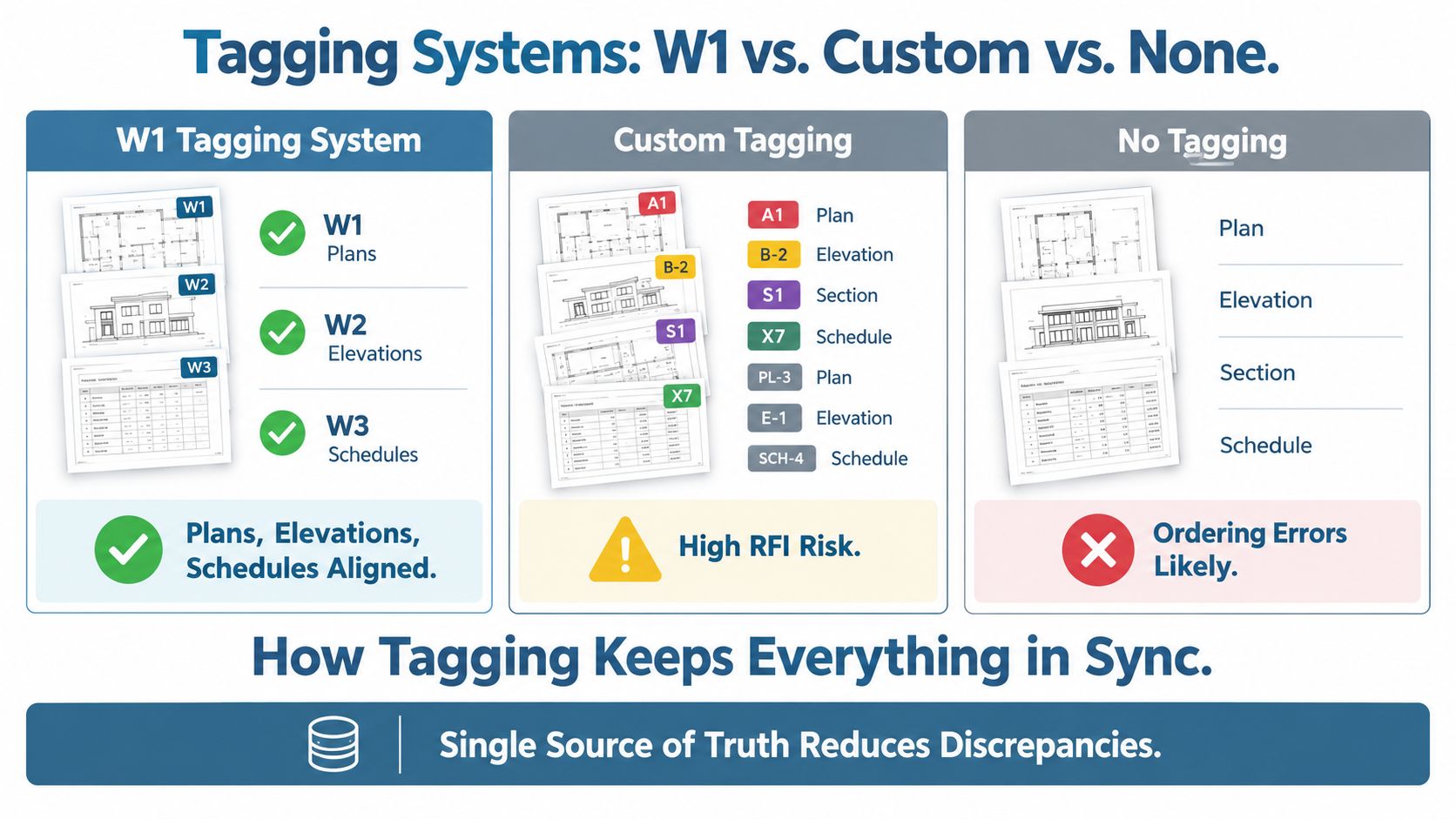
Use a stable type mark with controlled exceptions. Group openings in one row only when size, operation, frame, glazing, finish, and performance match. Itemize specialty openings when handing, sill condition, detail, hardware, structural support, or exposure differs. BIM workflows can group similar openings by type mark and quantity while retaining instance-specific exceptions, provided the model and schedule use the same parameters.
Version-control rule: Renumber only when the existing system prevents accurate coordination. After estimating, submittal, or ordering begins, preserve the original mark and issue a revision that maps the old identifier to the new one.
Do not reshuffle tags to make the schedule look cleaner. If W7 becomes W4 after pricing, the supplier may use the earlier takeoff while the installer follows revised elevations. That mismatch can send the wrong unit to the site or trigger an avoidable RFI.
Digital review tools help teams mark up drawings, compare revisions, and retain links between tags and supporting details. Teams may compare document coordination platforms with Exayard as a Bluebeam Revu alternative. The software matters less than the control: one approved tagging system, one revision history, and no informal renumbering.
Sample Schedule for New Construction Projects
A new-construction schedule should separate the manufactured unit from the framed opening. That distinction is especially important when a plan calls out a nominal product description while the framer needs a precise opening to build.
The sample below illustrates a Texas-style slab-on-grade project with repeated residential openings, an entry door, and a patio door. These are example entries for adapting the structure, not values to copy into a permit set. Confirm every size, rating, glazing value, and code note against the approved drawings, calculations, manufacturer data, and local requirements.
| Mark | Type | Size (W x H) | Rough Opening | Hand | Frame Material | Glazing | Operation | Egress | Code/Notes |
|---|---|---|---|---|---|---|---|---|---|
| W1 | Fixed window | Confirm by approved design | Confirm framing requirement | N/A | Vinyl | Insulated glazing, performance values by submittal | Fixed | Not an egress unit | Coordinate head, sill, flashing, and WRB |
| W2 | Single-hung window | Confirm by approved design | Confirm framing requirement | N/A | Vinyl | Insulated glazing, safety glass where required | Single-hung | Verify bedroom application | Record sill height and clear opening |
| W3 | Casement window | Confirm by approved design | Confirm framing requirement | N/A | Fiberglass or vinyl | Insulated glazing, performance values by submittal | Casement | Verify bedroom application | Coordinate operator clearance |
| W4 | Horizontal slider | Confirm by approved design | Confirm framing requirement | N/A | Vinyl | Insulated glazing, safety glass where required | Sliding | Verify clear opening if used for egress | Confirm active panel and meeting rail |
| W5 | Patio door | Confirm by approved design | Confirm framing requirement | Left or right from interior | Vinyl or fiberglass | Insulated safety glazing where required | Sliding | Not assumed | Coordinate sill, track, drainage, and accessibility |
| D1 | Exterior entry door | Confirm by approved design | Confirm framing requirement | From interior | Fiberglass | Glazing only if selected, safety requirements apply | Swing | Not applicable | Hardware set, threshold, weather seal |
| D2 | Secondary exterior door | Confirm by approved design | Confirm framing requirement | From interior | Fiberglass or steel | Solid or glazed per design | Swing | Not applicable | Confirm fire and accessibility requirements |
| W6 | Bathroom window | Confirm by approved design | Confirm framing requirement | N/A | Vinyl | Privacy or obscured glazing if specified | Fixed or operable | Not applicable | Record privacy glazing and ventilation intent |
| W7 | Utility window | Confirm by approved design | Confirm framing requirement | N/A | Vinyl | Insulated glazing | Fixed or operable | Not applicable | Coordinate mechanical and service clearances |
Use the schedule to identify flashing and WRB interfaces, not just the product. An elevation may show the opening, but the schedule can point to the sill pan, head flashing, sealant joint, and weather-resistive-barrier transition that installers must follow.
For a new-construction package, the estimator should be able to count W2 units without hunting through every elevation. The framing crew should locate the rough opening from the mark. The installer should know which units receive egress, safety-glazing, sill, and flashing attention. A manufacturer-facing order should never rely on a nominal label when the actual fabrication and framing requirements remain undefined. Teams comparing installation approaches can use this new-construction window reference as a product and sequencing resource, while still coordinating the final schedule with project documents.
Sample Schedule for Replacement and Retrofit Projects
Replacement work fails for a different reason. The opening already exists, but the existing frame, trim, sill, wall condition, and measurement history may be uncertain. A new-construction schedule can't capture those conditions adequately.
Measure existing openings at the top, middle, and sill, and record the frame depth. Note interior trim, exterior casing, sill condition, water damage, rot, masonry irregularities, and any mismatch between the measured opening and the proposed unit. Homeowner measurements rounded to the nearest inch aren't enough for a manufacturer's order. Replacement decisions often depend on whether an insert can remain inside the existing frame or whether a full-frame unit must remove it.
| Mark | Existing Size (W x H) | Frame Depth | Interior/Exterior Condition | Replacement Type | New Unit Size | New U-Factor / SHGC | Hand | Notes |
|---|---|---|---|---|---|---|---|---|
| R1 | Top, middle, sill measurements recorded | Record actual depth | Interior trim sound, exterior sill review | Insert candidate | Confirm after verification | Record approved values | N/A | Check square, plumb, and operating clearance |
| R2 | Measurements vary across opening | Record actual depth | Sill deterioration observed | Full-frame candidate | Recalculate after removal scope | Record approved values | N/A | Do not release insert order |
| R3 | Three-point measurements agree | Record actual depth | Trim reusable | Insert candidate | Confirm deduction and frame fit | Record approved values | N/A | Verify drainage and perimeter seal |
| R4 | Opening includes existing door frame | Record frame and threshold depth | Exterior trim damaged | Full-frame or door replacement | Confirm after field measure | Record approved values | From interior | Coordinate threshold and hardware |
| R5 | Existing unit operates poorly | Record frame depth | Interior casing may be replaced | Replacement type pending inspection | Hold until site verification | Record approved values | N/A | Document photos and concealed-condition risk |
Consider an insert replacement that appears to fit based on width and height. During inspection, the sill is found to be rotted and unable to support the retained frame. The insert solution is rejected, the scope changes to full-frame replacement, and the original measurements no longer control the order. That decision belongs in the schedule before fabrication, not in a hurried conversation at delivery.
The practical rule is simple: if existing condition isn't recorded, the order is a guess. A clear explanation of the difference between new-construction and replacement windows can help owners and contractors choose the correct measurement and installation path, but the project schedule still needs its own verified field record.
Energy Performance Fields by Climate Zone
A generic “energy-efficient window” note is too weak for a climate-sensitive project. The schedule should record U-factor and SHGC as measurable values, identify the applicable climate zone, and connect the selected product to the energy calculations and submittal documentation.
U-factor describes heat flow through the assembly, while SHGC describes how much solar heat enters through the glazing. In cooling-dominated Texas and Southwest conditions, SHGC can become the more consequential selection variable on sun-exposed façades. That doesn't make U-factor optional. The schedule needs both because the energy reviewer, estimator, supplier, and installer may be checking different parts of the same compliance package.
ENERGY STAR Most Efficient 2025 criteria use climate-zone-specific limits for residential windows and sliding glass doors. The stated U-factor thresholds are around 0.20 to 0.22, while SHGC limits range from 0.20 to 0.40, depending on region (ENERGY STAR Most Efficient 2025 criteria).
| Climate Zone | U-Factor (max) | SHGC (max) | Air Leakage | Notes |
|---|---|---|---|---|
| 1A | Around 0.22 | Up to 0.40 | Record the certified value | Cooling demand and solar exposure deserve close review |
| 2A | Around 0.22 | Up to 0.40 | Record the certified value | South-Central Texas projects should identify the zone explicitly |
| 2B | Around 0.22 | Lower regional limit may apply | Record the certified value | Dry heat and intense sun make solar control important |
| 3A | Around 0.20 to 0.22 | Lower regional limit may apply | Record the certified value | Mixed requirements need orientation and calculation review |
| 3B | Around 0.20 to 0.22 | Lower regional limit may apply | Record the certified value | El Paso projects shouldn't inherit a generic humid-climate selection |
| 4A | Around 0.20 to 0.22 | Regional limit applies | Record the certified value | Heating and cooling priorities must both be checked |
The table is a scheduling aid, not a substitute for the governing code or project calculation. South-Central Texas may fall in zone 2A, while El Paso may fall in zone 3B, so a product selected for one location shouldn't be copied into the other without review. Record visible transmittance, condensation resistance, air leakage, glazing type, operable-versus-fixed status, and the certification reference when those fields affect the project.
Naming ENERGY STAR without naming the climate zone and criteria cycle creates a procurement trap. A product can appear compliant in marketing material while carrying the wrong solar or thermal values for the project's calculation package. The ENERGY STAR window requirements reference is useful for organizing the discussion, but the final schedule must identify the exact values and documentation required for approval.
The Highest-Risk Fields That Drive Change Orders
Not every blank in a schedule deserves the same review effort. On Texas and Southwest projects, the following fields routinely deserve priority because they connect directly to framing, code review, procurement, or installation.
| Schedule Field | Failure Mode | Typical Consequence |
|---|---|---|
| Rough opening dimensions | Framed opening doesn't match the ordered assembly | Reframing, delayed installation, or unit return |
| Handing | Door swing or active panel is reversed | Hardware conflict, unusable circulation, field replacement |
| Egress compliance | Selected window lacks the required clear opening or sill condition | Failed inspection or a late product substitution |
| U-factor and SHGC | Product values don't match the declared climate zone or calculations | Rejected submittal, revised energy documentation, or replacement |
| Fire rating | Door assembly rating is omitted or unsupported | Inspection failure and hardware or slab changes |
| Accessibility clear width | Entry geometry doesn't provide the required passage | Threshold, frame, or door replacement |
| Glazing type | Safety glazing is missing near a hazardous location | Glass replacement and inspection delay |
| Sill and threshold details | Drainage, step, or interface condition is undefined | Water intrusion risk, trip concern, or installation improvisation |
Rough opening comes first because it controls the physical relationship between framing and product. A small discrepancy can spread across repeated openings, affect trim, and force the installer to choose between altering framing and compromising the installation.
Handing is next because crews often discover the error only when the door is physically placed. Plan symbols can be read from different orientations, so the schedule should state the reference side, typically the interior, and show the swing in the approved detail or shop drawing.
For bedrooms, don't assume a single-hung or slider automatically satisfies egress. Record the clear opening, sill condition, and applicable code note in the schedule, then verify the selected operation can deliver that geometry. Energy values deserve the same discipline. A product may have attractive marketing language yet fail to match the project's declared climate zone or REScheck documentation.
Glazing and fire-rating omissions are less visible during estimating but more severe at inspection. If the schedule doesn't identify the tested door assembly, safety glazing location, or accessibility condition, the team is relying on someone to notice the gap later. That's an expensive quality-control method.
Coordinating the Schedule with Estimating, Ordering, and Delivery
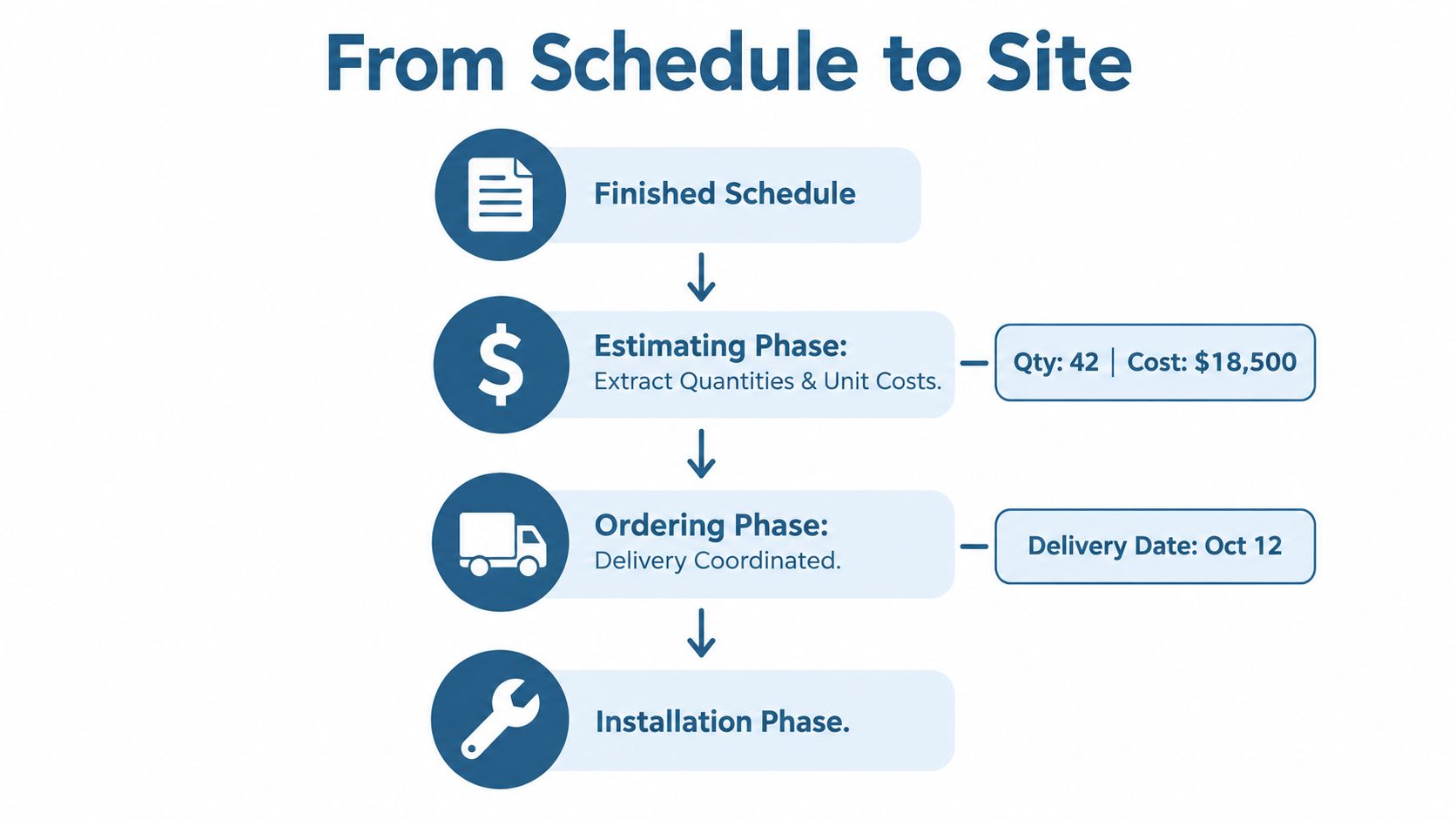
A finished schedule should move through the project in a controlled sequence. It isn't a standalone specification page that disappears after design development. Estimators use it for quantities, unit allowances, finishes, and alternates. Submittals use the mark numbers to prove that the proposed product corresponds to the design. Purchasing uses approved rows to release exact assemblies.
A practical coordination checklist looks like this:
- Estimating: Confirm every opening has a mark, quantity, size basis, product class, finish, glazing description, and allowance or price source.
- Submittals: Require the shop drawing or product data to reference the schedule mark, then compare operation, dimensions, frame, glass, hardware, ratings, and performance values.
- Ordering: Release only rows that carry approved selections and resolved exceptions. Hold ambiguous “owner choice” or “per plan” entries.
- Delivery: Match labels to marks and opening locations. Confirm staging protects units from damage and keeps them identifiable.
- Installation: Deliver the approved schedule, drawings, details, and field notes together. Don't make installers reconstruct the order from separate emails.
Special-sized units, custom finishes, impact-rated glazing, unusual frame depths, and nonstandard hardware deserve early attention because they can restrict supplier options and complicate delivery sequencing. The schedule should flag those conditions rather than hiding them in a general note.
Delivery timing affects more than storage. Units arriving before framing is ready need secure, dry staging and clear identification. Units arriving after interior finishes begin require protection against damage and a plan for moving them through completed spaces. The field supervisor should know which mark belongs to which opening before the truck arrives.
Control point: Verbal coordination can clarify a question, but it shouldn't replace a revised schedule, approved submittal, or documented RFI.
When the schedule changes, issue the revision to estimating, purchasing, the supplier, the superintendent, and the installer at the same time. That shared release prevents one trade from working from an obsolete row while another follows the corrected version.
From Schedule to Installer-Ready Instructions
An installer needs actions, not just product descriptions. Each schedule row should answer what arrives, where it goes, how it opens, how it interfaces with the wall, and what must be checked before fastening.
Start with handing diagrams tied to the mark. “Right-hand door” means little if the reference side isn't stated. Show the swing from the interior or identify the viewing direction used in the drawing. For sliding units, identify the active panel and meeting rail so the installer doesn't reverse the assembly at the opening.
Sill height deserves a field measurement and an installation note. Record the sill-to-floor relationship where it affects egress, furniture, guard conditions, or accessibility. For bedroom windows, include the clear opening dimension that the inspector will verify, not just the nominal frame size.
Flashing and sealing instructions should point to the relevant detail and manufacturer requirements. The schedule can flag sill pan, head flashing, WRB integration, sealant joint, drainage path, and fastener or anchor requirements when the assembly deviates from the standard installation. A note that says “install per manufacturer” may be valid as a supplement, but it shouldn't replace the project-specific condition.
Door hardware needs a coordinated set number. The installer and hardware supplier should be able to identify the lockset, hinges, closer, threshold, weather seal, and any multipoint or specialty hardware without interpreting a finish schedule from another discipline. The door slab, frame, hardware, and power or access-control requirements must agree before installation.
A field-ready row should also carry:
- Fastening: Identify unusual anchor patterns, substrate constraints, or structural attachment requirements.
- Shimming: State where support and alignment matter, especially at doors and large glazed assemblies.
- Sealing: Identify perimeter sealant, backer conditions, drainage, and compatibility requirements.
- Adjustment: Note operating checks, latch engagement, weather seal contact, and final alignment.
- Warranty protection: Require installation records and manufacturer procedures where warranty coverage depends on them.
The schedule becomes useful on site when every field points to a physical action. If an installer must ask what the mark means, the documentation hasn't finished its job.
Verifying the Schedule Against Submittals and Field Measurements
A draft schedule is a working hypothesis until approved submittals and field measurements confirm it. Verification should happen before fabrication release, before framing conceals the openings, and again before installation sign-off.
Use a four-part loop:
- Compare the schedule with the approved submittal. Flag any change in dimension, operation, frame material, glazing, U-factor, SHGC, handing, or hardware.
- Cross-check marks against framing. Confirm architectural tags and rough openings agree before the wall closes.
- Re-measure existing openings. On replacement work, reconcile top, middle, and sill dimensions with frame depth and condition notes.
- Obtain installer sign-off. Require the installer to confirm that the released schedule matches the opening conditions before fabrication or final installation.
Keep the evidence. Redlines, field photos, measurement sheets, approved shop drawings, and RFIs should remain attached to the project record even when no discrepancy appears. Jurisdictions such as Austin, Phoenix, and El Paso may request traceability between product documentation and field conditions during review, so the team should be able to show how the selected assembly reached the installed opening.
A clean schedule with no verification trail still leaves a weak record. The project needs to show not only what was specified, but also who confirmed it, which revision controlled the order, and whether the field condition matched the design assumption.
Quick-Reference Field Matrix for Fast Lookup
Keep this matrix with the people who price, release, receive, and install the openings. It connects each field to the decision it triggers and the mistake it prevents.
| Field | Code/Standard Trigger | Procurement Risk | Installation Consequence |
|---|---|---|---|
| Mark number | Drawing and submittal coordination | Wrong unit ordered or delivered | Unit installed at the wrong opening |
| Rough opening | Framing and installation requirements | Product doesn't fit the built opening | Reframing, shimming abuse, or delayed work |
| Unit size | Manufacturer fabrication | Incorrect assembly dimension | Excessive gaps or forced fit |
| Operation type | Product class and intended use | Fixed, hung, casement, or slider mismatch | Ventilation or egress function fails |
| Handing | Door circulation and hardware coordination | Wrong door or hardware set | Reversed swing or unusable clearance |
| Frame material | Specification and substrate compatibility | Wrong profile, finish, or durability | Interface and appearance problems |
| Glazing U-factor | Energy calculations and product criteria | Thermal value doesn't comply | Rejected submittal or replacement |
| SHGC | Climate-zone and solar-control requirements | Excess solar gain or noncompliant product | Comfort complaints and revised procurement |
| Air leakage | Product performance documentation | Missing certification or unsuitable unit | Drafts and performance concerns |
| Egress compliance | Residential life-safety review | Wrong operation or size | Failed inspection |
| Fire rating | Tested door and frame assembly | Unsupported slab or frame | Inspection failure |
| Hardware set | Hardware specification and accessibility | Missing or incompatible hardware | Door cannot be secured, latched, or adjusted |
The bold rows are the ones to review before the others because they combine immediate field consequences with limited recovery options. A finish mismatch can sometimes be corrected through a controlled selection. A wrong rough opening, handing, egress condition, or fire-rated assembly can force physical replacement or rework.
Frequently Asked Questions About Window and Door Schedules
How should the schedule relate to a BIM model?
Use shared type marks and synchronized parameters for dimensions, operation, material, glazing, performance, and hardware references. Instance-specific exceptions should stay attached to the individual opening, not buried in a generic type.
Which specification sections should be cross-referenced?
Coordinate the schedule with sections such as 08 11 13, 08 14 16, 08 33 23, and 08 71 00 where they apply to the project. Cross-reference hardware sets so the schedule and specifications don't assign conflicting products or finishes.
What belongs in the warranty handoff packet?
Include approved product data, installation instructions, warranties, care information, final markups, and records of substitutions or repairs. The schedule should identify the installed assembly and mark, while the handoff packet carries the supporting documents.
Can one schedule cover windows and doors?
Yes, when the project uses a consistent mark system and the columns can represent both product families without becoming unreadable. Separate sheets are usually clearer when door hardware, fire ratings, accessibility, and window performance require very different fields.
Does a schedule need a professional stamp?
That depends on the governing jurisdiction, project requirements, and the documents submitted for approval. Don't assume a schedule is exempt or automatically required. Confirm the permit and owner requirements with the responsible design professional.
How should phased multifamily work be handled?
Maintain one controlled master schedule, then issue phase-specific extracts that preserve the original marks and revision history. This keeps procurement and field teams aligned without creating disconnected numbering systems.
Breaking Glass Co. supplies and installs residential and commercial windows and doors, including new-construction packages, replacement work, and products suited to Texas and Southwest conditions. If you need help turning verified openings, performance requirements, and field measurements into an order-ready package, visit Breaking Glass Co. for a quote and project support.